Create Your First Budget
Learn how to set up your first budget and get ready to allocate your income.
Create Your First Budget
With your account ready, the next step is creating your first budget. A budget is your financial workspace in Moniqo, the place where your accounts, envelopes, and transactions all come together.
Steps
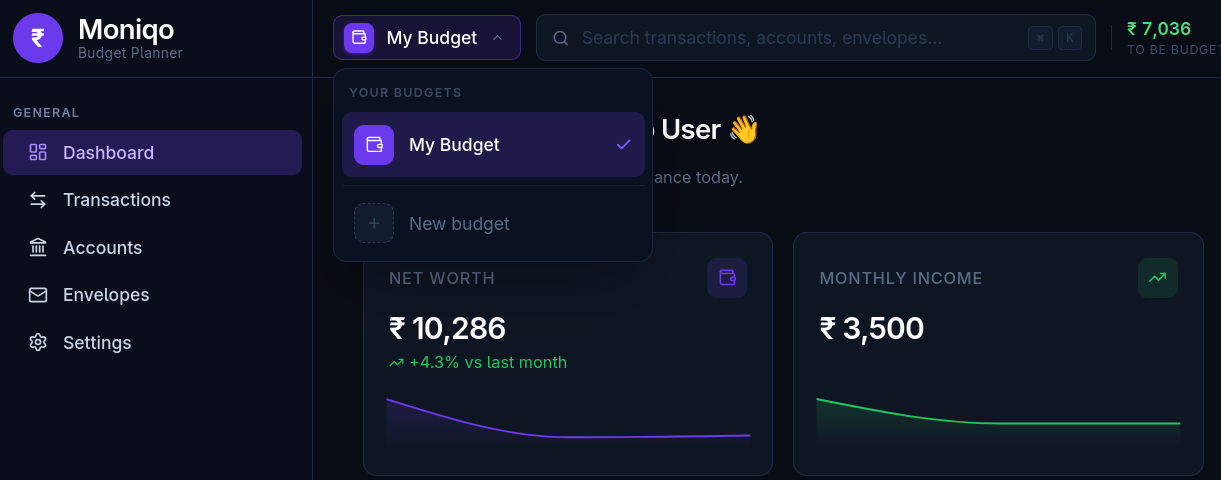
Follow these steps to create your first budget:
- From your dashboard, select the option to create a new budget.
- Give your budget a name, such as “Personal” or “Household.”
- Choose your currency. This is the currency all amounts in this budget will be tracked in.
- Confirm and create the budget.
Your budget is now created, but it starts empty. Next, you’ll want to add an account so Moniqo knows where your money actually lives, and start creating envelopes to give it a plan. If you’re wondering whether you’ll need to recreate this budget down the line, you won’t. See Understanding Budgets for why.
Tips
- Give your budget a clear, specific name if you plan to create more than one, such as separate budgets for personal and shared expenses.
- You can always come back and adjust your budget’s settings later, so don’t worry about getting everything perfect on the first try.
Next Steps
Now that your budget exists, head over to the Getting Started guide to add your accounts and start building out your envelopes.